1 to 2 Weeks
Typical launch window
Includes questionnaire mapping, contact sync rules, and intake workflow automation testing.
 D
D Automatically sync intake forms from DecisionVault into Lawmatics, and trigger automations when a form is submitted to DecisionVault.
Partner-grade
Implementation controls
Execution-ready
Rollout playbook
Implementation Proof
From kickoff through post-go-live support
1 to 2 Weeks
Typical launch window
Includes questionnaire mapping, contact sync rules, and intake workflow automation testing.
Every Response
Synced to Lawmatics
DecisionVault questionnaire responses create or update contacts with structured intake data.
MHSB does more than connect tools. We help law firms choose the right Lawmatics audit, build, and optimization sequence before configuration begins.
Book a Strategy Consultation
Review DecisionVault mapping, workflow impact, QA controls, and rollout priorities with MHSB.
Audit vs Build Guide
Choose whether your firm needs an audit, a scoped build, or a phased combination before implementation starts.
How MHSB Works
See our fixed-fee delivery model for audits, custom builds, QA, training, and launch support.
Lawmatics Implementation FAQ
Get answers on timelines, scope, training, integrations, and ongoing support.
DecisionVault syncs your completed forms over to Lawmatics, creating new Matters upon form submission. Each submission generates a contact and matter record with all collected fields populated, giving your intake team a complete picture of the prospect before any follow-up.
Trigger powerful Lawmatics Automations when a DecisionVault form is filled out and submitted. Different form types can trigger different automation sequences, allowing your firm to route family law inquiries to one pipeline and personal injury inquiries to another without manual intervention.
DecisionVault's guided questionnaire format captures more consistent and detailed information than free-form intake methods. This structured data flows into Lawmatics fields cleanly, improving downstream reporting accuracy and reducing the need for intake staff to follow up on missing details.
Estimated timeline: 1 to 3 weeks depending on the number of DecisionVault forms and the complexity of field mapping and automation routing.
Connect your DecisionVault account to Lawmatics and verify the integration handshake is active.
Map each DecisionVault form's fields to the corresponding Lawmatics contact and matter custom fields.
Configure which DecisionVault form submissions trigger which Lawmatics automations for practice-area routing.
Set up Lawmatics pipeline stages and follow-up sequences that activate when DecisionVault data arrives.
Run test form submissions through each DecisionVault form and verify that matters, contacts, field data, and automations behave as expected in Lawmatics.
A strong DecisionVault integration only works when field mapping, workflow ownership, QA, and team training are designed together. MHSB typically scopes this work as part of a Lawmatics audit, implementation project, or post-launch optimization engagement.
MHSB configures and optimizes the DecisionVault + Lawmatics workflow so your intake handoff, matter updates, and follow-up automations stay consistent as your firm scales. We handle the form-to-field mapping, automation routing, and QA testing that ensures DecisionVault’s structured data flows cleanly into your Lawmatics pipelines.
Automatically sync intake forms from DecisionVault into Lawmatics, and trigger automations when a form is submitted to DecisionVault. DecisionVault’s guided questionnaires collect detailed, structured prospect information that creates complete matter records in Lawmatics without manual data entry.
Standard web forms capture basic contact information, but they rarely collect the detailed, structured data that attorneys need to evaluate a potential case. DecisionVault solves this with guided questionnaires that adapt based on prospect responses, collecting the specific information relevant to each practice area.
For conflict checking, this is especially valuable. DecisionVault can collect party names, relationships, dates, and other details through a structured flow that ensures nothing is missed. When this data syncs to Lawmatics, your team has everything they need to run a conflict check before the first consultation rather than discovering missing information mid-meeting.
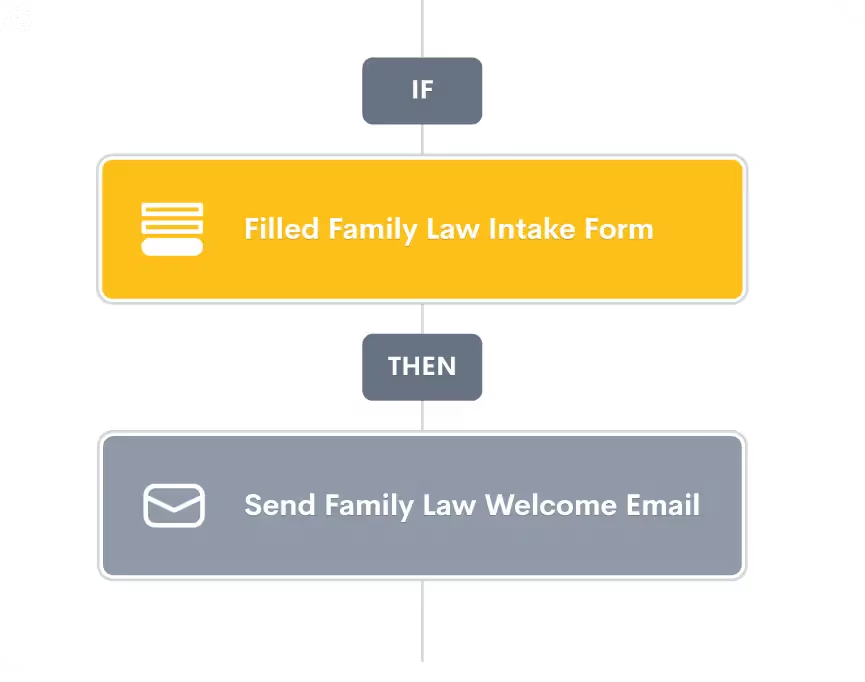
The real power of this integration emerges when DecisionVault form submissions trigger Lawmatics automations. A completed family law intake form can automatically assign the lead to a family law attorney, send a consultation confirmation email, and move the matter into the appropriate pipeline stage. A personal injury form can trigger a completely different sequence.
MHSB configures these automation pathways during implementation, ensuring each form type routes to the correct workflow. This eliminates the manual triage step where an intake coordinator reads a submission and decides what happens next. The routing happens automatically based on the structured data DecisionVault has already collected.
Long, static intake forms are a known conversion killer. Prospects abandon them when the questions feel irrelevant or the form feels endless. DecisionVault’s branching logic shows prospects only the questions relevant to their situation, keeping the experience focused and reducing abandonment rates. The result is more completed submissions with better data quality, which translates to more qualified leads entering your Lawmatics pipeline.
Yes. MHSB maps each form separately and configures distinct Lawmatics automations per form type, so family law, personal injury, and other practice areas each get their own intake workflow.
Yes. Because DecisionVault creates matters in Lawmatics, any automations tied to matter creation or specific pipeline stages will fire as configured.
DecisionVault uses guided, branching questionnaires that adapt based on prospect responses. This collects more structured and detailed information than a static form, especially for complex intake scenarios like conflict checks or financial disclosures.
DecisionVault supports save-and-resume functionality. Data syncs to Lawmatics only when the form is fully submitted, so your team never sees incomplete records.
Lawmatics duplicate detection rules apply. MHSB configures your handling preferences so existing contacts are updated with the new form data rather than creating duplicate records.
Yes. DecisionVault forms can be embedded on your website or shared via direct links in Lawmatics email sequences. MHSB helps configure the distribution method that fits your intake workflow.
Implementation Packages
MHSB can execute this integration as a focused sprint, a production hardening engagement, or a full operating-system rollout.
Most Selected
Questionnaire-to-contact mapping, field sync configuration, and intake automation setup.
Ideal for: Firms using DecisionVault questionnaires and connecting responses to Lawmatics intake.
Next Step
Get MHSB support to configure mapping, automations, and data quality checks for your integration rollout.