1 to 2 Weeks
Typical launch window
Includes chat configuration, contact creation mapping, and pipeline automation testing.
 CC
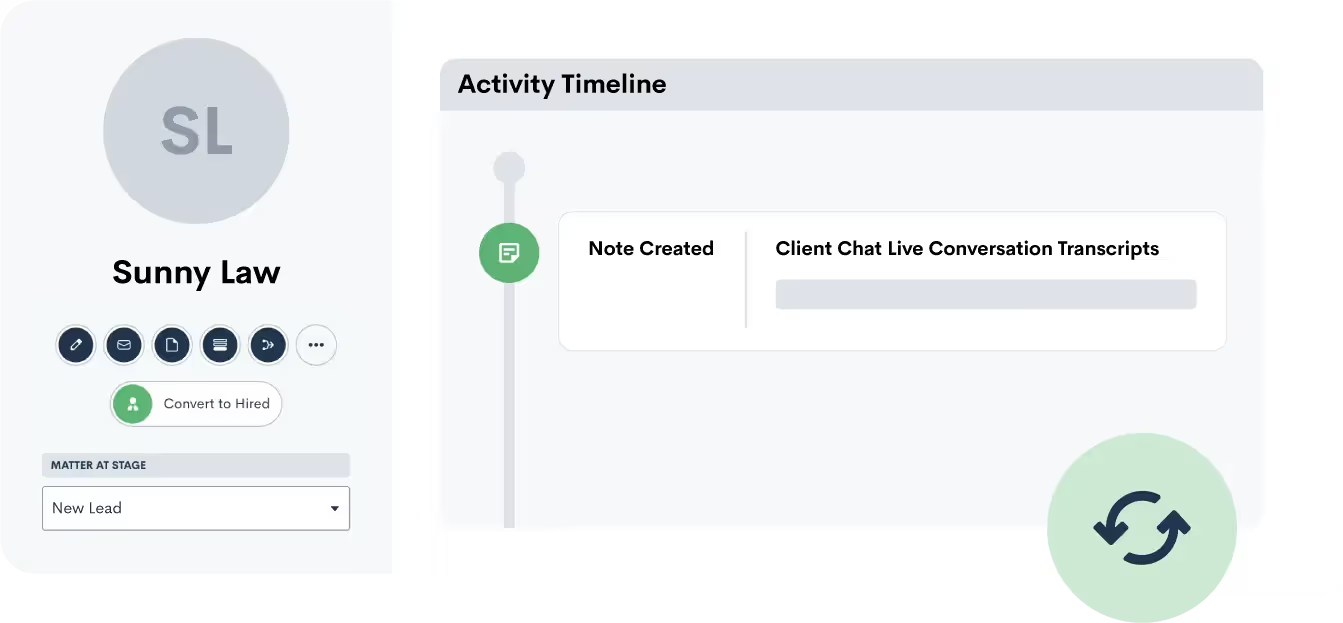
CC Push lead and client information from Client Chat Live into Lawmatics as a new matter. Transcripts of the initial conversation via Client Chat Live are also added as notes to a matter in Lawmatics.
Partner-grade
Implementation controls
Execution-ready
Rollout playbook
Implementation Proof
From kickoff through post-go-live support
1 to 2 Weeks
Typical launch window
Includes chat configuration, contact creation mapping, and pipeline automation testing.
Every Chat
Captured in Lawmatics
Client Chat Live conversations create contacts with transcripts and intake details.
24/7
Lead capture coverage
Live agents engage website visitors and push qualified prospects into your intake pipeline.
MHSB does more than connect tools. We help law firms choose the right Lawmatics audit, build, and optimization sequence before configuration begins.
Book a Strategy Consultation
Review Client Chat Live mapping, workflow impact, QA controls, and rollout priorities with MHSB.
Audit vs Build Guide
Choose whether your firm needs an audit, a scoped build, or a phased combination before implementation starts.
How MHSB Works
See our fixed-fee delivery model for audits, custom builds, QA, training, and launch support.
Lawmatics Implementation FAQ
Get answers on timelines, scope, training, integrations, and ongoing support.
Client Chat Live syncs with Lawmatics to transfer over any new leads from your web chats. While Client Chat Live handles your intake, your pipeline stays up to date in Lawmatics.
A transcript of the conversation between your lead and the Client Chat Live service will automatically save as a note to the matter's profile in Lawmatics. This offers you a record of communication with the lead.
Client Chat Live can proactively invite website visitors to chat after they have been browsing for a configured amount of time. This is especially effective on practice area pages where a visitor reading about divorce or personal injury is likely evaluating whether to contact your firm. The proactive invitation converts that hesitation into a conversation that becomes a Lawmatics matter.
During business hours, if a chat visitor wants to speak to someone immediately, Client Chat Live agents can transfer the conversation to a live phone call with your office. The chat transcript still gets pushed to Lawmatics as a matter note, so the person who takes the call has full context of what was already discussed.
Estimated timeline: 1 to 2 weeks. Script writing and proactive trigger configuration account for most of the time. Firms with a single practice area and a simple website structure can launch within the first week.
Connect Client Chat Live to Lawmatics by authorizing the integration from your Lawmatics Integrations page. MHSB confirms that test chat conversations produce correctly formed matters in Lawmatics before proceeding with customization.
Write chat scripts tailored to each practice area your firm handles. MHSB creates scripts that guide Client Chat Live agents through the qualifying questions that matter most for your intake process, like incident dates for PI cases, filing deadlines for family law, or debt amounts for bankruptcy.
Configure proactive chat triggers on high-intent pages. MHSB identifies which pages on your site have the highest visitor engagement and sets up Client Chat Live to invite visitors to chat after a specific browsing duration, increasing the number of conversations without waiting for visitors to initiate.
Set up Lawmatics automations that respond to new Client Chat Live matters. MHSB builds workflows that send an immediate email to the chat visitor confirming their inquiry was received, assign the matter to the correct pipeline stage, create an intake follow-up task, and notify the responsible attorney.
Test the complete workflow across desktop and mobile, during business hours and after hours, for each practice area. MHSB verifies that transcripts are complete, pipeline assignments are correct, proactive triggers fire on the right pages, and real-time call connects work when the office is open.
A strong Client Chat Live integration only works when field mapping, workflow ownership, QA, and team training are designed together. MHSB typically scopes this work as part of a Lawmatics audit, implementation project, or post-launch optimization engagement.
Client Chat Live brings a legal-industry focus to website chat that matters when the person on the other end of the conversation is deciding whether to trust your firm with their case. Generic chat services treat every visitor the same, but a prospective divorce client browsing your custody page at 9 PM needs a fundamentally different conversation than someone shopping for a plumber. Client Chat Live’s agents are trained to navigate these conversations with the right balance of empathy and information-gathering.
The Lawmatics integration turns those conversations into structured pipeline data. Each chat produces a matter with contact information, qualifying details, and the complete transcript attached as a note. This is valuable because chat conversations contain nuance that a simple web form never captures. When a prospective PI client types “I was rear-ended at a stoplight three weeks ago and my back still hurts,” that sentence tells your intake coordinator more about the case than a form field labeled “Describe your injury.”
MHSB focuses the implementation on maximizing the number of conversations that happen (through proactive triggers on high-intent pages) and maximizing the quality of data those conversations produce (through practice-area-specific chat scripts). When both are dialed in, your Lawmatics pipeline fills with qualified leads who have already described their situation in their own words.
Push lead and client information from Client Chat Live into Lawmatics as a new matter. Transcripts of the initial conversation via Client Chat Live are also added as notes to a matter in Lawmatics.
Client Chat Live provides managed live chat services staffed by agents trained for the legal industry. When a visitor engages the chat widget on your website, the agent qualifies the visitor using your firm’s scripts and collects the contact details and case information your intake process requires. The resulting matter in Lawmatics includes the visitor’s contact information and the complete chat transcript.
For firms investing in content marketing or SEO to drive traffic to practice area pages, Client Chat Live is the conversion layer that turns readers into leads. A well-written practice area page gets a visitor thinking “this firm understands my problem.” A proactive chat invitation, timed to appear when the visitor has been reading for 45 seconds, turns that thought into “let me tell them about my situation.” The Lawmatics integration ensures the resulting conversation becomes a trackable, actionable matter rather than an anonymous interaction.
Common setup path from supplemental documentation: Connecting Client Chat Live to Lawmatics. Key configuration decisions include writing practice-area chat scripts, configuring proactive invitation triggers on high-intent pages, setting up real-time call connect during business hours, and building Lawmatics automations for immediate follow-up.
Client Chat Live focuses on the legal industry. Its agents understand that law firm website visitors are often in a stressful situation and need empathetic, non-legal-advice conversation. They also know how to ask qualifying questions without overstepping into legal counsel. MHSB builds on that foundation by writing firm-specific scripts.
Yes. During business hours, agents can offer a real-time call connect that transfers the visitor to your office phone. The chat transcript still gets saved to the Lawmatics matter so whoever answers the call has the full context. MHSB configures the call connect routing as part of setup.
Client Chat Live uses an asynchronous script that loads after your page content, so it does not block page rendering or affect your site speed scores. MHSB verifies load performance during implementation to confirm there is no noticeable impact.
Client Chat Live agents can politely redirect visitors who fall outside your practice areas, and the chat is still logged in Lawmatics as a non-qualifying contact. MHSB helps you define decline criteria in the chat script so agents know when to redirect and what to say.
Client Chat Live can capture the referring page URL, which tells you whether the visitor was on your car accident page, divorce page, or general contact page. MHSB uses this data to help you understand which practice area pages generate the most chat leads and optimize your content accordingly.
Client Chat Live works on any website that supports a JavaScript snippet, including WordPress, Squarespace, Wix, and custom-built sites. MHSB handles the widget installation and verifies it loads correctly across your site.
Implementation Packages
MHSB can execute this integration as a focused sprint, a production hardening engagement, or a full operating-system rollout.
Chat-to-contact configuration, practice area tagging, and follow-up automation setup.
Ideal for: Firms adding live chat lead capture to their Lawmatics intake pipeline.
Most Selected
Multi-practice routing rules, chat qualification alignment, and expanded pipeline automation.
Ideal for: Firms with multiple practice areas that need chat leads categorized and prioritized automatically.
Next Step
Get MHSB support to configure mapping, automations, and data quality checks for your integration rollout.