Legal Operations
Convert More Leads with Intelligent Client Intake
MHSB scopes and configures intake forms, routing, and follow-up for law firms. This page describes the Lawmatics configuration; MHSB services for Clio, MyCase, and other systems are described on the platform pages.
Plan the intake implementation path before you configure forms
Great client intake systems depend on workflow design, routing, automation, and training. Use these MHSB service pages to choose the right implementation path first.
Book a Strategy Consultation
Review intake bottlenecks, qualification logic, form strategy, and implementation priorities with MHSB.
Lawmatics Audit vs Build
Choose whether you need intake optimization, a rebuild, or a phased implementation plan.
How MHSB Works
See our fixed-fee audit, build, QA, training, and launch process.
Implementation FAQ
Answers on timelines, integrations, training, and support.
First Impressions Matter
MHSB scopes intake forms around the information the firm needs at first contact.
Custom Intake Forms
Build branded intake forms that collect exactly the information you need. Use conditional logic to show relevant questions based on practice area, case type, or previous answers. Embed forms on your website or send them via email.
- Lawmatics drag-and-drop form builder with configurable fields
- Conditional logic for dynamic questionnaires
- Mobile-responsive design for on-the-go clients
- Multi-page forms for complex intake processes
- Auto-save functionality prevents data loss

E-Signatures & Document Automation
Streamline your onboarding with built-in e-signature capabilities and document generation. Automatically populate engagement letters, retainer agreements, and fee schedules with client data.
- Legally binding electronic signatures
- Template library for common documents
- Automatic data population from intake forms
- Multi-party signing workflows
- Audit trail for compliance and security

Automated Workflows
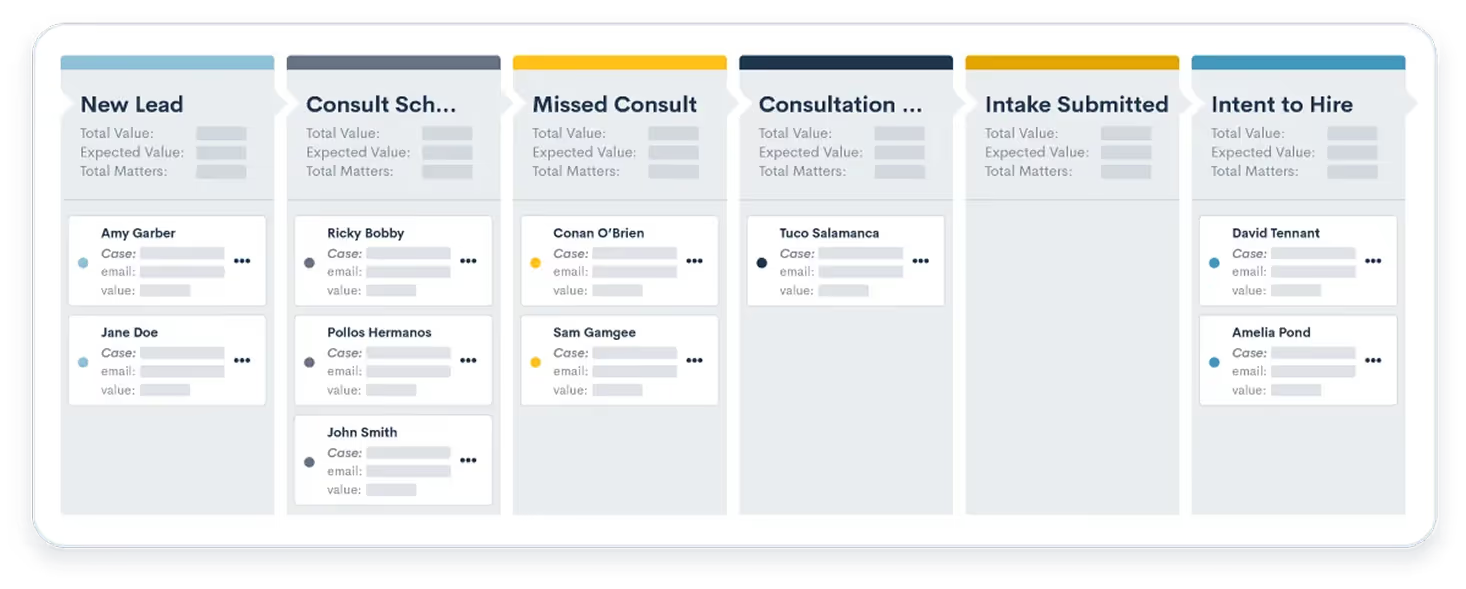
Save hours with intelligent automation. Automatically assign leads, send follow-up emails, create tasks, and move prospects through your pipeline based on their responses and behavior.
- Trigger actions based on form submissions
- Automated lead routing to the right attorney
- Instant email confirmations and next steps
- Task creation for intake coordinators
- Integration with your case management system

Client Portal Access
The Lawmatics client portal supports document uploads, case-status access, and client messages.
- Secure document upload and storage
- Real-time case status updates
- Two-way messaging with your team
- Payment processing integration
- Mobile app for iOS and Android

Lead Scoring & Qualification
Identify your best leads automatically. Score prospects based on practice area fit, case value, urgency, and other criteria. Focus your team's time on high-value opportunities.
- Customizable scoring criteria
- Automatic prioritization in your pipeline
- Qualification workflows to filter leads
- Analytics on lead quality by source
- Integration with marketing attribution
Explore Client Intake Features
Dive deeper into the tools that power faster intake, cleaner data, and better client experiences.
Legal Workflow Management
Automate processes with visual pipelines.
Legal Forms
Capture data with custom intake forms.
Legal Calendaring
Automate scheduling and reduce no-shows.
Electronic Signature
Secure, compliant e-signatures built-in.
Legal Document Automation
Generate error-free docs in seconds.
Legal File Management
Securely request and organize client files.
Built for Every Practice Area
Personal Injury
Gather accident details, medical history, and insurance information upfront
Family Law
Collect sensitive information securely with privacy controls and e-signatures
Immigration
Multi-language forms with document checklists and status tracking
Estate Planning
Comprehensive questionnaires for assets, beneficiaries, and wishes
Frequently Asked Questions
How long does it take to set up intake forms?
MHSB scopes intake forms, conditional logic, and document automation in the Lawmatics form builder as part of the buildout. MHSB provides starting templates for common practice areas.
Can I customize the look and feel of my intake forms?
Yes. You can add your firm logo, customize colors to match your branding, and configure the form layout. Forms can be embedded directly on your website or hosted on a branded landing page.
What happens when a client submits an intake form?
You have complete control over the workflow. Common actions include: sending the client a confirmation email, notifying your intake team, creating a lead in your CRM, assigning the lead to an attorney, and triggering follow-up sequences. All of this happens automatically based on your configuration.
Are e-signatures legally binding?
Lawmatics provides the e-signature feature used in this workflow. Whether an electronic signature is sufficient for a particular document or jurisdiction is a question for the firm; MHSB configures the signing workflow and does not give legal advice.
Can intake forms integrate with my existing practice management software?
Lawmatics integrations with Clio, MyCase, PracticePanther, and Smokeball are documented in the MHSB integration guides. Lawmatics can transfer intake information to the connected practice management system, subject to the supported records and field mapping.
Next Step
Scope the intake implementation with MHSB
Book a strategy consultation and MHSB will scope the intake implementation for your firm on Clio, MyCase, Lawmatics, or the platform you already run.