1 to 2 Weeks
Typical launch window
Includes folder structure mapping, sync rules, and document access configuration.
 O
O Keep critical folders and files up to date in both Lawmatics and OneDrive. Upon activation of this integration, each of your Lawmatics contacts, matters, and companies will appear in your OneDrive account as new folders. With our two way sync functionality, any file that is uploaded to either OneDrive or Lawmatics will automatically sync to both accounts.
Partner-grade
Implementation controls
Execution-ready
Rollout playbook
Implementation Proof
From kickoff through post-go-live support
1 to 2 Weeks
Typical launch window
Includes folder structure mapping, sync rules, and document access configuration.
Every Document
Accessible from Lawmatics
OneDrive files linked to matters are accessible directly from contact and matter records.
Cloud-Based
No local storage required
Documents stay in OneDrive while Lawmatics provides the organized access layer.
MHSB does more than connect tools. We help law firms choose the right Lawmatics audit, build, and optimization sequence before configuration begins.
Book a Strategy Consultation
Review OneDrive mapping, workflow impact, QA controls, and rollout priorities with MHSB.
Audit vs Build Guide
Choose whether your firm needs an audit, a scoped build, or a phased combination before implementation starts.
How MHSB Works
See our fixed-fee delivery model for audits, custom builds, QA, training, and launch support.
Lawmatics Implementation FAQ
Get answers on timelines, scope, training, integrations, and ongoing support.
A new folder will be created in your OneDrive account for your Lawmatics matters/contacts. Additionally, any custom folders that you have created within a particular matter in Lawmatics will also be created within that root folder. The folder naming convention includes the Lawmatics entity ID to prevent collisions when multiple contacts or matters share similar names.
When files are saved in Lawmatics they will automatically be synced into the proper folder in OneDrive. With the two-way sync capabilities of this integration, any files uploaded into OneDrive will also automatically be saved in the appropriate Lawmatics matter as well. This means attorneys can save documents directly from their desktop to OneDrive and have them appear in Lawmatics without any extra steps.
Not every matter needs to sync to OneDrive. MHSB configures selective sync rules so your firm can choose which matters, contacts, or companies maintain a live OneDrive connection. Unsynced records preserve their mapping so sync can be re-enabled later without losing folder structure.
Estimated timeline: 1 to 2 weeks including account connection, folder structure review, selective sync configuration, team training, and QA testing.
Connect your OneDrive account to Lawmatics and authorize the bidirectional sync permissions.
Review the initial folder creation in OneDrive to confirm that contacts, matters, and companies are structured correctly with proper naming conventions.
Configure selective sync rules to determine which entity types and specific records should maintain a live OneDrive connection.
Establish file naming and folder organization conventions with your team so documents saved to OneDrive land in the correct matter folders.
Test the two-way sync by uploading files from both Lawmatics and OneDrive, then verify they appear in both locations with correct file names and folder placement.
A strong OneDrive integration only works when field mapping, workflow ownership, QA, and team training are designed together. MHSB typically scopes this work as part of a Lawmatics audit, implementation project, or post-launch optimization engagement.
MHSB configures and optimizes the OneDrive + Lawmatics workflow so your intake handoff, matter updates, and follow-up automations stay consistent as your firm scales. We handle the initial sync planning, folder structure review, selective sync configuration, and team training that ensures your firm’s documents stay organized across both platforms.
Keep critical folders and files up to date in both Lawmatics and OneDrive. Upon activation of this integration, each of your Lawmatics contacts, matters, and companies will appear in your OneDrive account as new folders. With our two way sync functionality, any file that is uploaded to either OneDrive or Lawmatics will automatically sync to both accounts.
Lawmatics is pleased to integrate with OneDrive, helping to simplify your document and file storage. Thanks to this integration, any files that you have saved in Lawmatics can now be easily and automatically synced directly to OneDrive. No need for any manual downloading and re-uploading.
Legal work generates a constant stream of documents: engagement letters, signed retainers, intake questionnaires, court filings, correspondence, and more. Without a file sync integration, attorneys and staff must manually download files from one system and upload them to another, or worse, maintain separate copies that quickly fall out of sync.
The OneDrive integration eliminates this friction. An intake coordinator who saves a signed engagement letter in Lawmatics knows it will appear in OneDrive within minutes. An attorney who drafts a document on their laptop and saves it to the OneDrive matter folder knows it will be available in Lawmatics for other team members. This bidirectional flow removes manual file management from the daily workflow.
For firms already invested in the Microsoft 365 ecosystem with Outlook, Teams, and SharePoint, the OneDrive integration extends Lawmatics into that existing infrastructure. Attorneys who live in Microsoft apps all day can access client files without context-switching to a different platform. Documents created in Word, Excel, or PowerPoint can be saved directly to the OneDrive matter folder and synced to Lawmatics automatically.
MHSB configures the integration to complement your existing Microsoft 365 setup, ensuring the folder structure in OneDrive is intuitive for your team and the sync behavior matches your firm’s document management policies.
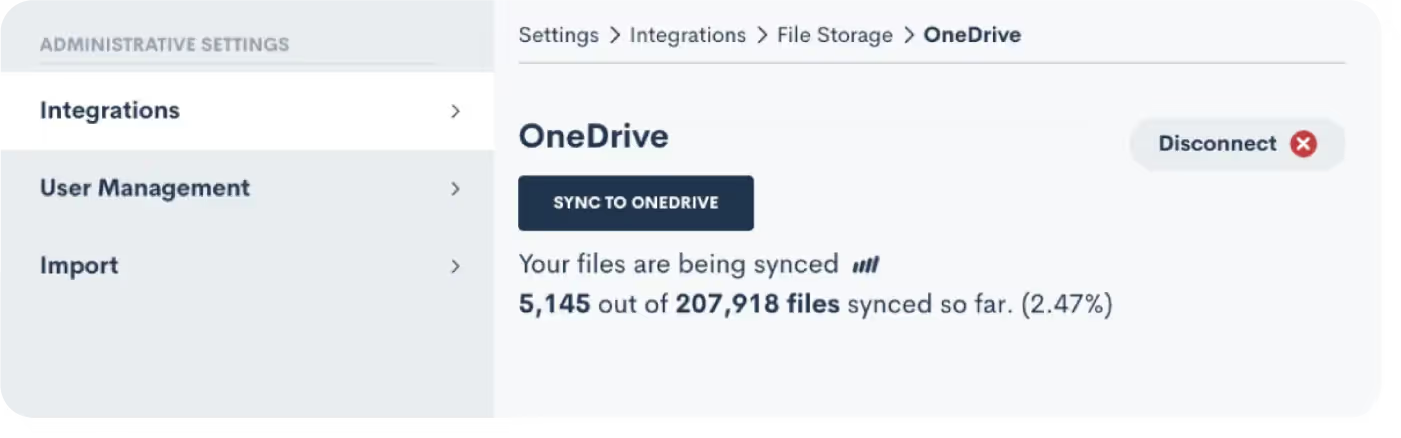
The initial sync can involve a significant volume of files for firms that have been using Lawmatics for months or years. MHSB plans this phase carefully, reviewing file volumes, identifying any naming convention issues, and staging the rollout to avoid overwhelming OneDrive storage or creating confusion with folder organization. After go-live, we help establish file hygiene practices so the bidirectional sync remains clean and useful rather than becoming a source of clutter.
Yes, the initial sync creates folders and syncs existing files for all connected entities. For firms with large file volumes, MHSB plans a phased rollout to manage the initial sync load.
Yes. Selective sync controls allow you to exclude specific matters, contacts, or companies from the OneDrive connection while keeping others actively synced.
File deletions in OneDrive will reflect in Lawmatics through the two-way sync. MHSB recommends establishing a file management policy and training your team on the implications of bidirectional sync before go-live.
The integration connects to OneDrive. For firms using SharePoint for document management, MHSB can advise on the best configuration approach during the implementation planning phase.
Each Lawmatics user connects their own OneDrive account. For firms that want a shared file repository, MHSB can configure the sync to point to a shared OneDrive folder structure.
OneDrive's file size limits apply. For most legal documents this is not an issue, but MHSB reviews your typical file sizes during planning and advises on any limitations.
Implementation Packages
MHSB can execute this integration as a focused sprint, a production hardening engagement, or a full operating-system rollout.
Most Selected
Folder structure mapping, document sync configuration, and matter-level file access setup.
Ideal for: Firms using OneDrive for document storage and needing organized access from Lawmatics.
Next Step
Get MHSB support to configure mapping, automations, and data quality checks for your integration rollout.