1 Week
Typical launch window
Includes form configuration, appointment booking setup, and intake automation testing.
 BO
BO Let Back Office Betties complete Lawmatics intake forms over the phone with your new clients (or via web chat). With Back Office Betties and Lawmatics connected, you'll automatically see updates in your Lawmatics account: new contacts will be created and existing contacts will be updated after each call, complete with the post-call summary notes.
Partner-grade
Implementation controls
Execution-ready
Rollout playbook
Implementation Proof
From kickoff through post-go-live support
1 Week
Typical launch window
Includes form configuration, appointment booking setup, and intake automation testing.
Every Call
Creates or updates a contact
Back Office Betties calls populate Lawmatics with intake data and post-call notes.
Direct Booking
Calendar access for receptionists
Virtual receptionists schedule consultations directly in your Lawmatics calendar.
MHSB does more than connect tools. We help law firms choose the right Lawmatics audit, build, and optimization sequence before configuration begins.
Book a Strategy Consultation
Review Back Office Betties mapping, workflow impact, QA controls, and rollout priorities with MHSB.
Audit vs Build Guide
Choose whether your firm needs an audit, a scoped build, or a phased combination before implementation starts.
How MHSB Works
See our fixed-fee delivery model for audits, custom builds, QA, training, and launch support.
Lawmatics Implementation FAQ
Get answers on timelines, scope, training, integrations, and ongoing support.
Back Office Betties syncs with Lawmatics to transfer over any new leads. While Back Office Betties handles your intake, your pipeline stays up to date in Lawmatics.
Using Lawmatics booking links or booking requests from within a form, the Back Office Betties team can book a consultation or other meeting with your leads/clients, directly in your Lawmatics calendar.
Estimated timeline: 1 week for standard setup including form configuration, booking link setup, and test call validation.
Create or identify Lawmatics intake forms that Back Office Betties will use during calls. Ensure required fields match the information receptionists will collect.
Connect Back Office Betties to your Lawmatics account and configure form access permissions.
Set up Lawmatics booking links so receptionists can schedule consultations directly in attorney calendars.
Run test calls to verify that contacts are created, forms are completed, appointments are booked, and post-call notes appear on the contact timeline.
A strong Back Office Betties integration only works when field mapping, workflow ownership, QA, and team training are designed together. MHSB typically scopes this work as part of a Lawmatics audit, implementation project, or post-launch optimization engagement.
Back Office Betties provides virtual receptionists who answer your firm’s phones and webchat, complete Lawmatics intake forms during the conversation, and book consultations directly in your calendar. The integration eliminates the gap between a prospect calling and your team having a usable contact record.
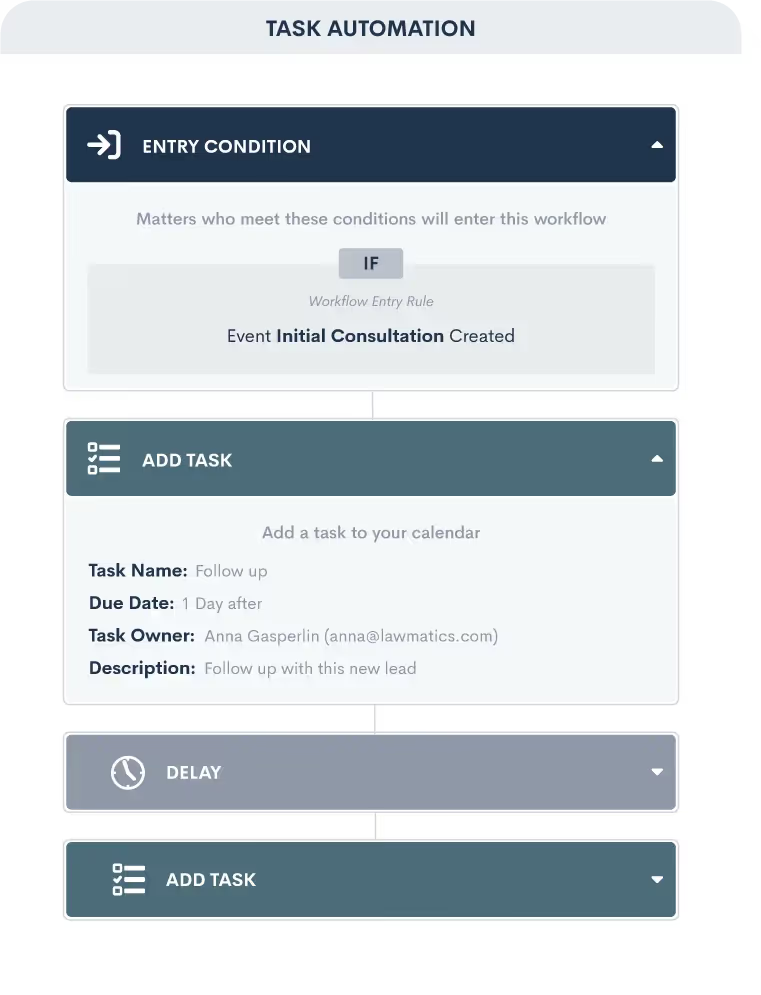
MHSB configures the integration so that Back Office Betties has access to the correct Lawmatics forms and booking links, and so that new contacts trigger your intake automation for assignment, tagging, and follow-up. For solo practitioners and small firms, this means you never miss a lead during court or client meetings.
When a prospect calls or chats, the Back Office Betties receptionist collects their information using your Lawmatics intake form. If the caller qualifies, the receptionist books a consultation using your Lawmatics booking link. After the call, a summary note is added to the contact record. Your team picks up a fully populated contact with an appointment already scheduled.
MHSB ensures the forms are structured for receptionist use (clear field labels, required fields that match the call script), booking links point to the right attorney calendars, and pipeline automations fire correctly when new contacts arrive.
Yes. They complete your Lawmatics intake forms during the phone call, so the contact record has all the fields your team needs before the callback.
Yes. Using Lawmatics booking links or booking requests embedded in intake forms, Back Office Betties can schedule appointments that appear on your Lawmatics and connected Google/Outlook calendar.
Post-call summary notes are automatically added to the contact record after each call, giving your team context on what was discussed and what the caller needs.
Implementation Packages
MHSB can execute this integration as a focused sprint, a production hardening engagement, or a full operating-system rollout.
Most Selected
Form configuration, booking link setup, receptionist training coordination, and intake automation testing.
Ideal for: Solo and small firms adding virtual receptionist coverage to their Lawmatics intake.
Next Step
Get MHSB support to configure mapping, automations, and data quality checks for your integration rollout.